Why Pine Script runs out of time
A Pine script runs once on every historical bar, and an indicator runs again on every price update of the live bar. Whatever one line costs, the chart pays it tens of thousands of times. When the total grows too large, TradingView stops the script with an error, and the feature behind it never reaches the chart.
In a small indicator that budget is rarely a concern. In a dashboard, a simulation, a machine learning model or a system of objects, it decides what can be built at all. And the cost is seldom one heavy formula. It is the work around it, repeated on every bar, that does not change the result:
- Rerunning a calculation whose inputs did not change.
- Shifting an array to keep a rolling history.
- Removing objects from parallel arrays.
- Scanning a whole collection to find the few entries that changed.
- Searching for a key one element at a time.
- Building new arrays on every bar.
Each section below explains one of them, shows the data structure that removes it, and animates the difference.
Measure before you change anything
TradingView's Pine Profiler, available from the Pine Editor, runs the script and reports how much of the total time each line and block took. Profile on the symbol, timeframe and history the script will really run on: costs that grow with bars or with collection size only show up there. Fix the few lines at the top of the list, profile again, and confirm the plotted values did not change.
Recalculating results that did not change
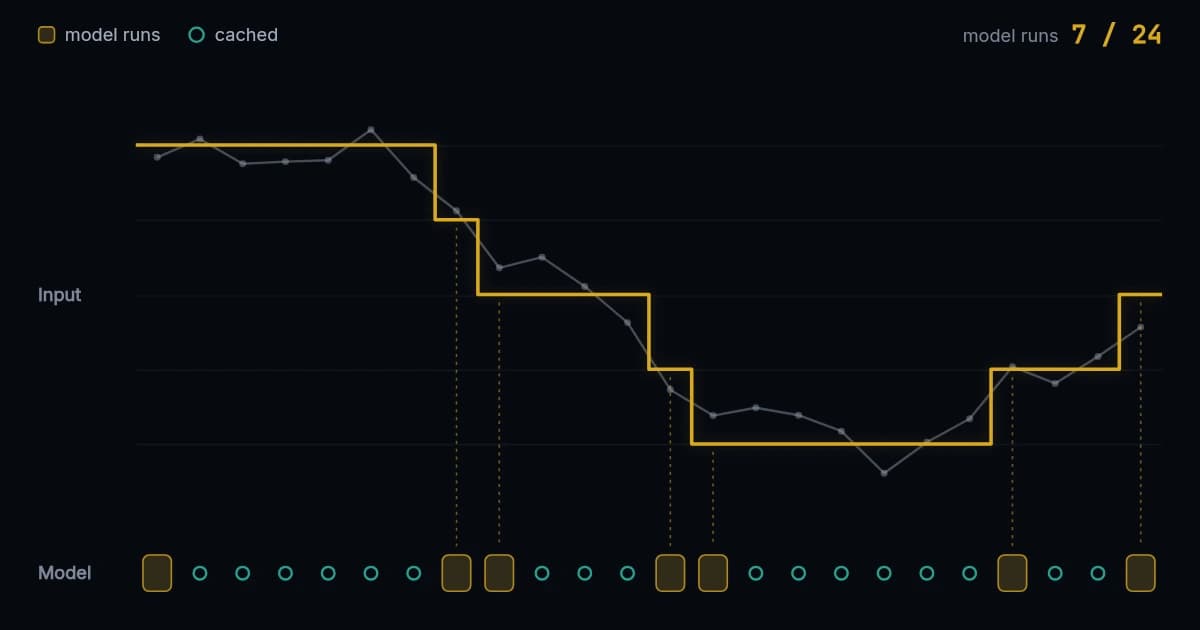
The fastest calculation is the one that never needed to run. A scenario model, a fit or a solver often depends on a few inputs that hold steady for many bars, yet it reruns on every one of them. Caching stores the result together with the inputs it was built from, and reruns the work only when an input is different.
The catch is that raw inputs, such as prices or indicator values, change on almost every bar, so a cache keyed on them almost never hits. Round them first to the precision the model actually responds to. A trend measured in tenths of an ATR, or volatility in quarters of a percent, describes a regime that holds for several bars, and the model runs only when the regime moves.
Without a cache, the model runs on every bar
An expensive model is called on all 24 bars, although its input hardly moves between most of them. Each of those runs costs the full calculation.
A cache by hand
In plain Pine, a cache is a stored result plus a copy of every input it depends on:
// Pseudocode: scenarioModel() is an expensive, pure calculation.
float atr14 = ta.atr(14)
float trend = (ta.ema(close, 20) - ta.ema(close, 50)) / atr14
float regime = math.round(trend * 2) / 2

var float lastRegime = na
var float result = na

if na(lastRegime) or regime != lastRegime
    result := scenarioModel(regime)
    lastRegime := regime

plot(result)
That works for one input. With four, it becomes four saved copies, a longer condition, and a first-run case to get right, and Pine's float comparison rounds, so a tiny real change can slip through. The same idea as an OptiPine Memo:
var op.FloatMemo model = op.floatMemo()

if model.staleOn(regime)
    model.store(scenarioModel(regime))

plot(model.get())
staleOn() takes up to four floats, two integers, a bool and a string, compares them exactly, and is true on the first bar and whenever one changed. If the inputs repeat on nine bars out of ten, the model runs a tenth as often.
Watchers: noticing a change without storing the result
Sometimes the script already owns the result, or the result is not a single value. A watcher only remembers what it saw last and reports whether the input is different now. For an array it compares against a snapshot it keeps, and rewrites the snapshot only after a change; in our tests that compare-first check ran 35% to 60% faster than rewriting the snapshot every time.
// Pseudocode: features is an array<float> another part of the script fills.
var op.Watch featureWatch = op.watch()
var float score = na

if featureWatch.changed(features)
    score := evaluate(features)
Shifting arrays to keep a rolling history
Keeping the latest N events, such as pivots, trades or sampled features, is usually written as a push and a shift. Once the array is full, every new event moves all the others one place, and none of that movement changes what the history contains:
float pivot = ta.pivothigh(high, 5, 5)

var array<float> pivots = array.new<float>()

if not na(pivot)
    pivots.push(pivot)
    if pivots.size() > 200
        pivots.shift()  // moves the other 199 values
A ring buffer keeps the same values in a fixed number of slots and a pointer to the oldest one. A new value overwrites that slot and the pointer moves on; nothing else moves. Reads still come back in time order, because position 0 is defined as the oldest value, wherever it is stored.
An array moves every value for each new event
To keep the latest eight events, the usual array drops the oldest with array.shift() and pushes the new one. The seven values in between all move one place, on every event.
A ring by hand needs a head index, a count and modular arithmetic:
int SIZE = 200
var array<float> pivots = array.new<float>(SIZE, na)
var int head = 0   // the next slot to write, which holds the oldest value
var int count = 0

float pivot = ta.pivothigh(high, 5, 5)

if not na(pivot)
    pivots.set(head, pivot)
    head := (head + 1) % SIZE
    count := math.min(count + 1, SIZE)

// The newest value sits just behind the head.
float latest = count > 0 ? pivots.get((head - 1 + SIZE) % SIZE) : na
OptiPine's row rings keep that bookkeeping inside, store rows of several values when needed, and copy the history out in time order with at most two contiguous copies, which ran 90% faster in our tests than rebuilding the output row by row:
var op.FloatRowRing pivots = op.floatRowRing(200, 1)

float pivot = ta.pivothigh(high, 5, 5)

if not na(pivot)
    pivots.pushValue(pivot)

float latest = pivots.newestAt(0, 0) // pivots.at(0, 0) is the oldestRemoving objects from parallel arrays
Scripts that track zones, levels or trades often store each field in its own array and use the position as the object's identity. Removing one object then shifts every later entry in every array, and any position saved elsewhere in the script now points at a different object.
The fix is to separate identity from storage. Each object keeps an ID, a map gives the ID a slot, and a removed object's slot goes onto a free list for the next new object. Nothing moves, saved positions stay correct, and the payload arrays never shrink or shift.
Identity tied to position breaks on removal
Objects A to D each keep four fields in four parallel arrays. Removing B shifts C and D one place in every array, and an index saved for C now points at D.
// Pseudocode: newZone, zoneBroken, zoneId and top come from the script.
var op.StablePool zones = op.stablePool()
var array<float> zoneTops = array.new<float>()

if newZone
    [slot, created] = zones.acquire(zoneId)
    op.ensureSizeFloat(zoneTops, slot + 1, na)
    zoneTops.set(slot, top)

if zoneBroken
zones.release(zoneId) // frees the slot; no other zone movesacquire(), release() and find() are all constant time. When createdis true, the slot may be recycled and still hold the previous object's values, so write every field before reading any.
Scanning everything to find a few changes
A dashboard may hold thousands of cells while a handful change on a given bar. The usual dirty flag per entry finds them by visiting every entry, and then has to clear every flag before the next bar. The work follows the size of the collection, not the number of changes.
A sparse set keeps a list of the entries that were marked, ignores a second mark of the same entry, and starts the next cycle by advancing a counter instead of clearing anything: each entry remembers the cycle it was marked in, so old marks simply stop counting. In our tests, with 1% of the entries changed, this ran 93% faster than clearing and scanning.
A flag array visits everything to find a few
Three of sixty entries changed. With a flag per entry, finding them means visiting all sixty, and every flag has to be cleared again before the next bar.
// Pseudocode: zoneMoved, movedSlot and redraw() come from the script.
var op.DirtySet changed = op.dirtySet(500)

changed.begin()  // a new cycle; nothing is cleared

if zoneMoved
    changed.mark(movedSlot)

for slot in changed.values()
    redraw(slot)
Searching for keys one by one
Looking up an object by its ID with array.indexof(), or a loop, checks the elements one at a time. No single structure is best for every set of keys, though. Consecutive IDs need no lookup at all, only a subtraction. A compact range fits a small table. Unordered keys suit Pine's map type, which holds up to 50,000 pairs. Keys that are already sorted can be found by binary search with no extra storage.
Consecutive keys need no table at all
When the keys run 410, 411, 412 and on, a key’s slot is the key minus the first key. The store does one subtraction per lookup and keeps no extra storage.
OptiPine's typed stores look at the keys when they are built and choose among those four automatically. In our tests, direct addressing ran 21% faster than a map, and a map ran 91% faster than repeated linear search with 32 entries.
var op.IntFloatStore scores = op.intFloatStore()

if barstate.isfirst
    scores.build(
      array.from(410, 411, 412, 413),
      array.from(0.80, 0.30, 0.95, 0.50))

float selected = scores.get(412)  // 0.95
Building new arrays on every bar
A collection declared without var is created again on every execution of the script, and so are any arrays made inside a loop or function on every bar. Declare long-lived collections with var, and clear or refill them instead of replacing them:
// A new array on every execution of the script.
array<float> window = array.new<float>()

// One array for the whole run, emptied and refilled each bar.
var array<float> window = array.new<float>()
window.clear()
Calls that return arrays can do the same: OptiPine's copying calls take an optional output array and refill it rather than allocating, and its double buffers swap a current and a previous array in constant time for work that reads one pass while writing the next.
The optimization that breaks an indicator
Every technique above skips work on some bars. That is safe for pure calculations, which depend only on their inputs. It is not safe for ta.* functions and other calls that keep their own history: inside a condition that is false on some bars, they miss those bars and return different values. Pine Script v6 also evaluates and and or lazily, so a call on the right of and can be skipped too.
// Wrong: ta.atr() only runs on the bars where the cache misses.
if model.staleOn(trendRegime)
    model.store(fit(trendRegime, ta.atr(14)))

// Right: ta.atr() runs on every bar, and its rounded value is a dependency.
float atr14 = ta.atr(14)
float atrRegime = math.round(atr14 / close * 400.0) / 4.0

if model.staleOn(trendRegime, atrRegime)
    model.store(fit(trendRegime, atrRegime))
Plot the old and the new values together across the whole history after each change. An optimization that changes a value is a different indicator.
OptiPine: the same structures, ready to import
Every structure in this guide can be written by hand in Pine, and each hand-written version brings its own index arithmetic, bookkeeping and edge cases. OptiPine is our open-source Pine Script v6 library that packages them behind small calls, built from the techniques we use in Pine3D and NeuraLib. In our tests its optimized paths commonly ran 15% to 40% faster than conventional implementations of the same tasks, and over 90% faster for sparse updates and keyed lookups against a full scan or search.
//@version=6
indicator("My Script", overlay = false)

import Alien_Algorithms/OptiPine/1 as op
Using it follows the same three steps every time:
- 1Create each structure once, in a
varvariable. - 2Tell it what changed, or what the result depends on.
- 3Read the result on every bar; the structure decides when the work runs.
| Pitfall | OptiPine | Guide |
|---|---|---|
| Recalculating unchanged results | Memo, Watch, CadenceGate | Watch & Memo |
| Shifting a rolling history | FloatRowRing, IntRowRing, RingCursor | Row Rings |
| Removing objects from parallel arrays | StablePool, SlotCache | StablePool |
| Scanning for a few changes | DirtySet | DirtySet |
| Searching keys one by one | Typed stores, IntIndex, IntBuckets | Typed Stores |
| New arrays on every bar | Output arrays, double buffers | Buffers |
The library is free to use with credit under CC BY-NC-SA 4.0. Start with the quickstart, read the source on the TradingView publication, or see each technique explained on the OptiPine page.
Questions
Why is my Pine Script so slow?
Usually because of work that repeats on every bar without changing the result: an expensive calculation rerun on the same inputs, arrays shifted to keep a rolling window, whole collections scanned to find a few changes, or keys searched one element at a time. The Pine Profiler in the Pine Editor shows which lines take the time.
How do I find which part of a Pine Script is slow?
Run the Pine Profiler from the Pine Editor on the chart the script normally uses. It reports the share of the total runtime spent on each line and block, so you can start with the few lines that dominate and check again after each change.
Is a ring buffer faster than array.shift() in Pine Script?
For a full rolling history, yes. array.shift() moves every remaining element on each new entry, while a ring buffer writes over the oldest slot and moves nothing. For a value on every bar, such as close, neither is needed: close[50] already reads past values directly.
Does caching a calculation change its result?
Not when the calculation is pure, meaning its result depends only on its inputs. The risk is putting history-dependent calls such as ta.ema() or ta.atr() inside the cached block: they skip bars and return different values. Compute those on every bar and pass their results in.
Is OptiPine free?
Yes. OptiPine is open source under CC BY-NC-SA 4.0: free for non-commercial use when Alien_Algorithms is credited. Commercial use needs a licence from Alien_Algorithms.